
Account Mapping: Build the Org Chart Before You Dial

Account mapping means drawing the part of a prospect's org chart that matters for your deal before you start calling: who decides, who pays, who uses, who can block, and how they report to each other. For outbound, five to eight contacts per account is enough. The map is finished when every name has a role, a direct number and a reason to be called.
One contact per account is not prospecting. It is a bet on one person picking up.
What an account map is, and what it is not
A company org chart shows everyone. An account map shows the few people involved in one buying decision, and what you know about each.
For a typical B2B SaaS sale, we look for these roles:
- The decision maker, who owns the problem and signs off on the choice.
- The budget owner, who may be the same person in a small company and is rarely the same in a large one.
- The users, who live with the problem every day and describe it best.
- The technical or operations gatekeeper, who checks integration, security or process.
- A coach, someone who will tell you how decisions really get made there.
Five to eight people cover these roles with a spare or two. Fewer and you depend on luck. More and nobody on your team calls them all.
This article is about building the map. Running the calls across it is a separate skill, covered in multithreading by phone.
Where to find a prospect's org chart
No company publishes the chart you need. You assemble it from several sources, each incomplete.
- LinkedIn. The people tab of the company page, filtered by function and location. Titles show level. Team sizes show where the weight is.
- The company website. Leadership pages, press releases, speaker bios at events.
- Job postings. "Reports to the VP Sales" tells you a reporting line. A wave of SDR openings tells you a priority.
- Public company registries. Legal representatives, subsidiaries and addresses. In France the Sirene directory published by INSEE lists legal entities and their establishments.
- Your own CRM. Past contacts, old opportunities, former customers who moved there. Reps only use about 20% of the signals already in their CRM, and this is a large part of the unused 80%.
- The calls themselves. "Who else works on this with you?" is the best mapping question there is. Every conversation, even a refusal, should add a name.
French groups: map the business unit, not the holding
Large French groups are rarely one company. They are a holding with subsidiaries, brands and business units, each with its own management, budget and tools.
Calling the group headquarters to sell something a business unit buys is a common way to lose a month. The group CIO may set a framework. The unit's sales director is the one with your problem.
So start by choosing the unit. Check the legal entity that employs your target contacts on their LinkedIn profiles and in the registry, and build one map per unit. In our experience, three maps of six people in three subsidiaries beat one map of eighteen people at the top.
A simple account map template: six columns
You do not need a diagram tool. A list view in HubSpot or Salesforce, or a sheet, with six fields per contact does the job.
- Name and title. As written today, not as in a two-year-old export.
- Role in the decision. Decider, budget, user, technical, coach, unknown.
- Reports to. One name. This is what turns a list into a chart.
- Direct number. Mobile or direct line. A contact without a number is not on the map yet.
- Reason to call. A trigger specific to that person: a new job, a hire, a post, a past exchange with you.
- Status. Not called, attempted, spoke, supporter, blocker.
Leave "unknown" visible. An honest map with three question marks is more useful than a tidy one built on guesses. The question marks are your discovery questions for the first conversations.
Who to call first on the account map
The instinct is to start at the top or at the bottom. We start where people answer.
In the Sonik benchmark of 1,000,000 B2B cold calls in France, the average connect rate is 11.3%, but sales and leadership profiles pick up above 15%. If your map contains a sales leader or an executive, that is your first dial.
Then use the persona slots. Founders pick up more around 10am, marketing around 4pm, HR around 1pm. Order the map by who is reachable in the slot you are calling in.
Third, favour contacts with a trigger. Trigger-based openers reach a 7-10% meeting rate against 2-3% for pitch-first openers. A user who joined last month with a reason to call beats a VP with none.
And use each conversation to feed the next one. "I spoke with your colleague in operations this morning" is a different call from a cold one.
Keep the map alive with job-change signals
An org chart starts ageing the day you finish it. People are promoted, leave, get replaced, and each move changes who decides.
Three events should trigger an update:
- A new arrival in a mapped role. New leaders review tools and suppliers in their first months, in our experience. It is one of the best moments to call.
- A departure. Your champion leaving closes one door and opens another: follow them to their new company, where the map starts with a supporter.
- A reorganisation. New reporting lines mean the budget may have moved.
Review the maps of your top accounts once a quarter. Ten minutes per account is enough if the six columns are filled.
How Sonik approaches account mapping
We see the account map as a call list with context, not as a drawing. What matters is that each contact on it arrives in front of the rep with a number, a role and a reason to be called.
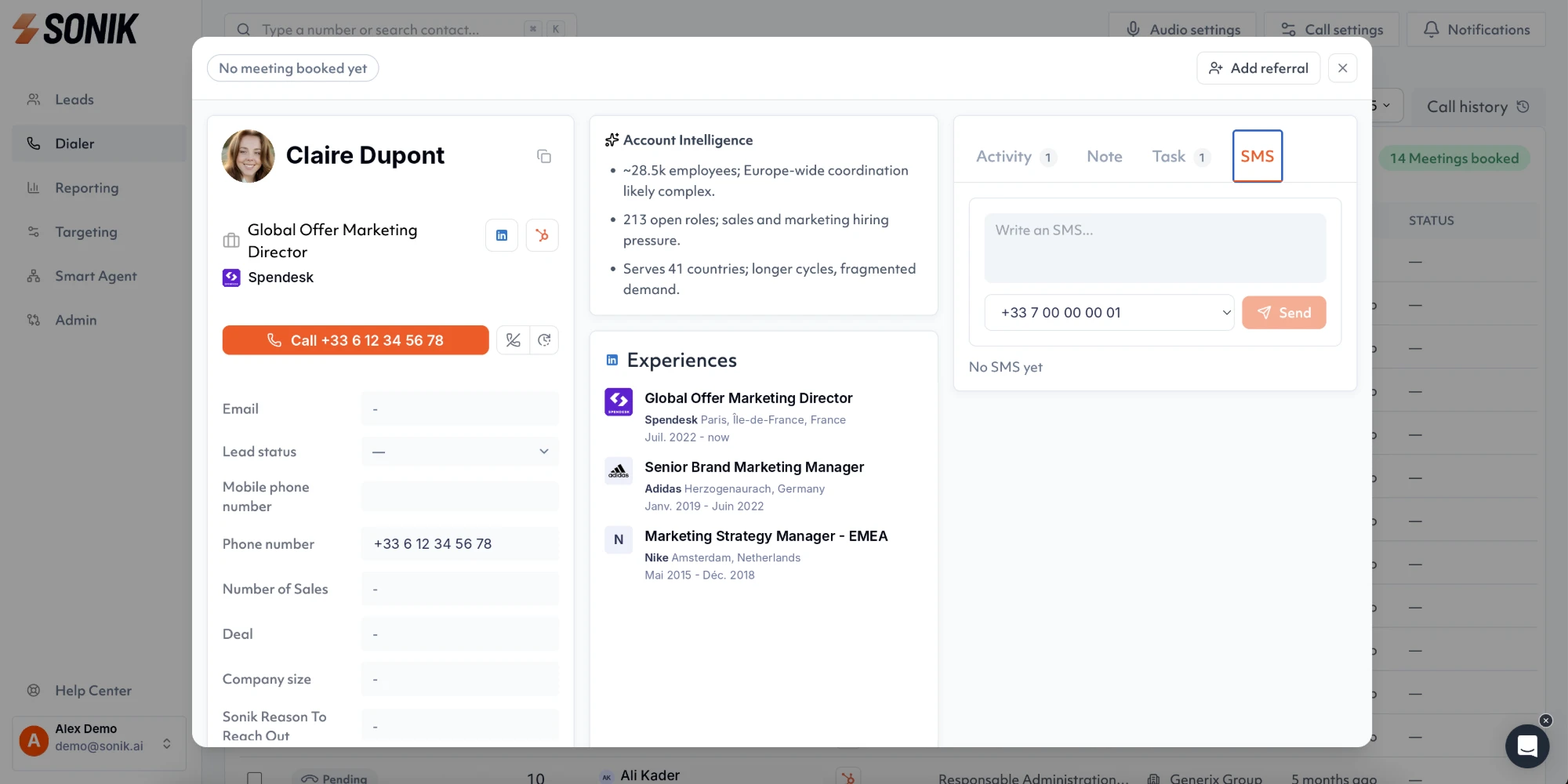
In Sonik, the contact view shows the account intelligence and the person's experiences before the call, so the rep knows where the contact sits and where they came from. Signals such as job changes, website visits, closed-lost deals and dormant leads flag when a mapped account is worth calling again.
Then the dialer calls across the map in parallel. Half of Sonik's own pipeline comes from signals that were already in the CRM.
Conclusion
Build the org chart before you dial, but build the small one: five to eight people, six columns, one business unit. Start with the contact most likely to pick up and let each call add a name. This week, take your top five target accounts and count the contacts with a role and a direct number. If any account has fewer than five, that is your mapping work for Monday.