Get started
Still unsure of the impact of Sonik?
See it for yourself and ask for your free trial


AI account research works when it produces a one-screen brief in under five minutes per account, built from your CRM, one trigger and the persona, and delivered inside the tool the rep dials from. It fails when it produces a ten-paragraph company summary the rep reads once and never uses. Here is the workflow we use, the tool layers that feed it, and the research you should stop doing.
The purpose of research is a better first sentence and a better second question. That is all.
Most SDRs do too much of it, badly. Twenty minutes on a website, a LinkedIn page and a funding database for one contact who connects 11% of the time means 20 minutes spent on a call that does not happen nine times out of ten. Across our benchmark of 1,000,000 B2B cold calls in France, the connect rate averages 11.3%. Research per contact has to be priced against that.
The other failure is the opposite one: no research, and an opener that explains what you sell. 65% of reps open that way. Trigger-based openers reach a 7-10% meeting rate against 2-3% for pitch-first ones. The gap is the whole business case for AI research: it makes the trigger opener cheap enough to use on every call.
We keep the brief to four blocks. If an AI tool cannot fill them, it is a company encyclopedia, not sales research.
Who at this account has ever talked to us, when, and how it ended. A demo in 2024, a lost deal to "no budget", three opened emails last week. Reps use only about 20% of the signals already in their CRM, and 50% of our own pipeline came from signals that were already there. The brief must put them in front of the rep.
The one thing that changed recently: a hire, a job change, a pricing page visit, a funding round, a new office in Lyon. One trigger, not five. The rep needs a reason to call today, not a timeline.
Role, the pain that role usually owns, and the slot when that role picks up. Founders answer most around 10am, marketing around 4pm, HR around 1pm in our data. Research that ignores timing is half research.
A single sentence the rep can say in the first eight seconds, naming the trigger. The AI drafts it; the rep edits it. That edit is the only manual research step we keep.
You do not need six tools. You need four layers, and ideally fewer products than layers. We describe categories, not vendors.
The buying criterion that matters most: does the research land where the call happens? A separate research tool, however clever, adds a tab, and every tab costs conversations.
Company history, mission statements, the CEO's podcast appearances, the full tech stack. None of it changes the first sentence of a cold call. In our experience the reps who research the most book the fewest meetings, because research is the most comfortable way to avoid dialing.
Also skip research on contacts you cannot reach. Check the mobile number first.
Sonik's AI call prep builds the brief automatically for every contact in a dialing session. It reads the CRM history, the signals we detect (website visits, job changes, closed-lost anniversaries, dormant leads, social intent) and the persona, and writes the trigger and a suggested opener.
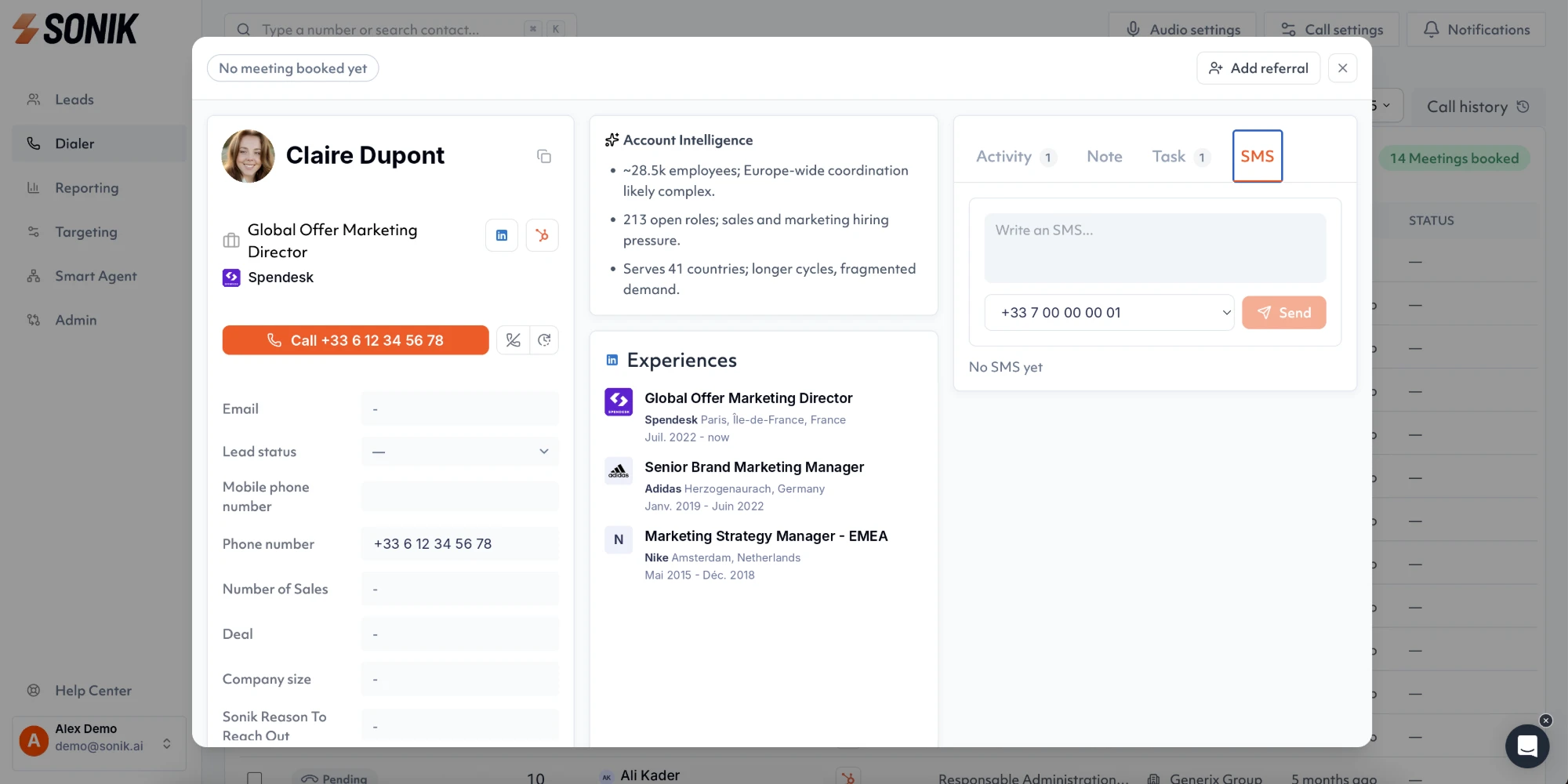
The brief appears on the rep's screen the moment a call connects in the parallel dialer. After the call, the AI logs the summary and the next step to the CRM. The rep's only research task is to read four lines and decide the first sentence.
We built it this way because the alternative, deep research on a list that connects 11% of the time, is where SDR hours go to die.
AI account research pays when it is short, batched and delivered at connect. Four inputs, one screen, five minutes per account at most. This week, take tomorrow's call list, write the trigger and the opener for each contact before the block instead of during it, and count how many calls open on the trigger rather than the pitch. That ratio is the metric that moves meetings.