
Click-to-Dial: What It Is and When You Outgrow It

Click-to-dial, also called click-to-call, turns every phone number in your CRM or browser into a button: one click and the call starts from your computer, usually with the call logged on the contact afterwards. It removes the typing and the copy-paste. It does not remove the ringing, the voicemail and the wrong numbers, which is where a rep's hour actually goes. Here is what click-to-dial gives you, who it is enough for, and the signs that a team has outgrown it.
How click-to-dial works
There are three common forms.
- Inside the CRM. Your phone tool integrates with HubSpot, Salesforce or Pipedrive and adds a call button next to each number on the contact record.
- A browser extension. The extension detects phone numbers on any web page, including LinkedIn profiles and company websites, and makes them clickable.
- A softphone link. Numbers written as telephone links open your softphone app, the way an email address opens your mail client.
In all three, the call goes out over VoIP through your headset. The better setups also open a small window with the contact's details during the call and write the call, its duration and your notes back to the CRM when you hang up.
What it saves
Three real gains, none of them spectacular.
- Seconds per call. No reading a number on one screen and typing it on another. Over 50 calls, that is a few minutes and a lot less friction.
- No misdials. A typed number has one wrong digit more often than anyone admits, especially with international formats.
- Calls that get logged. This is the gain that matters most. A call made from the CRM record lands on the CRM record. A call typed on a mobile phone exists only in the rep's memory.
What it does not solve
Click-to-dial speeds up the start of the call. The time goes elsewhere. In our benchmark of 1,000,000 B2B cold calls, the average connect rate is 11.3%: about nine dials in ten end in ringing, voicemail or a switchboard. With click-to-dial, the rep sits through each of them, one at a time.
The arithmetic is short. A rep clicking through a list by hand makes, in our experience, 15 to 25 dials an hour once you count the ringing, the voicemail greeting and the note after each call. At an 11.3% connect rate, that is two or three conversations an hour, and five to eight in a normal day with meetings and admin. Our north star for an SDR is 20 conversations a day. Click-to-dial alone does not get there, however disciplined the rep.
It also leaves the choice of who to call next to the rep. Every hang-up is followed by a few seconds of scrolling and deciding. Those seconds add up, and the decisions get worse as the afternoon goes on.
Who click-to-dial is enough for
For several roles it is the right tool and a dialer would be too much.
- Account executives calling their open deals, their customers and a handful of prospects a day. They need the call logged and the context on screen, not volume.
- Account managers and customer success, whose calls are scheduled and whose contacts usually answer.
- Follow-ups and callbacks. Returning one call to someone who asked for it is a one-click job.
- Founders making their first 20 prospecting calls a week, where each call is researched individually.
- Very small, high-value lists, such as 30 target accounts where each call is prepared for ten minutes.
Five signs you have outgrown it
- Conversations per rep per day are under ten despite full calling blocks. The rep is not slow. The method is.
- Reps spend more time listening to ringing than talking. Ask them, or look at talk time against session time.
- Lists are never finished. A 300-contact list takes two weeks, and the signal that justified it has expired by the end.
- Call logging is patchy again. Reps skip the notes to save time, and the CRM stops telling the truth.
- New hires ramp slowly because they get too few conversations a day to practise on.
What comes after: power and parallel dialers
The next step keeps the click-to-dial comfort and removes the waiting.
A power dialer works through a list automatically: when one call ends, the next number is dialed without a click, and voicemails can be skipped or handled with a recorded message. The rep still hears each ring, one line at a time. Dial volume rises and the "who next?" decision disappears. See what a power dialer is.
A parallel dialer calls several numbers at once and connects the rep only when a person answers. The ringing and the voicemails happen in the background. In our data that gives reps around 5x more conversations than dialing one number at a time: about 127 calls, 10 conversations and 0.66 meetings booked per hour of calling. We explained the mechanics in what a parallel dialer is.
The modes are not exclusive. A good setup lets the same rep run a parallel session on a cold list in the morning and click-to-dial three follow-ups from the CRM in the afternoon.
One point for European teams: whichever mode you use, the rules on who you may call, on recording and on identifying yourself apply in the same way. Faster dialing does not change the legal basis of the call, and the number shown to the prospect should be one they can call back.
How Sonik approaches click-to-dial
We see click-to-dial as the right mode for a prepared, one-off call and the wrong mode for a list. Sonik offers both in the same place, so the rep chooses by situation and not by tool.
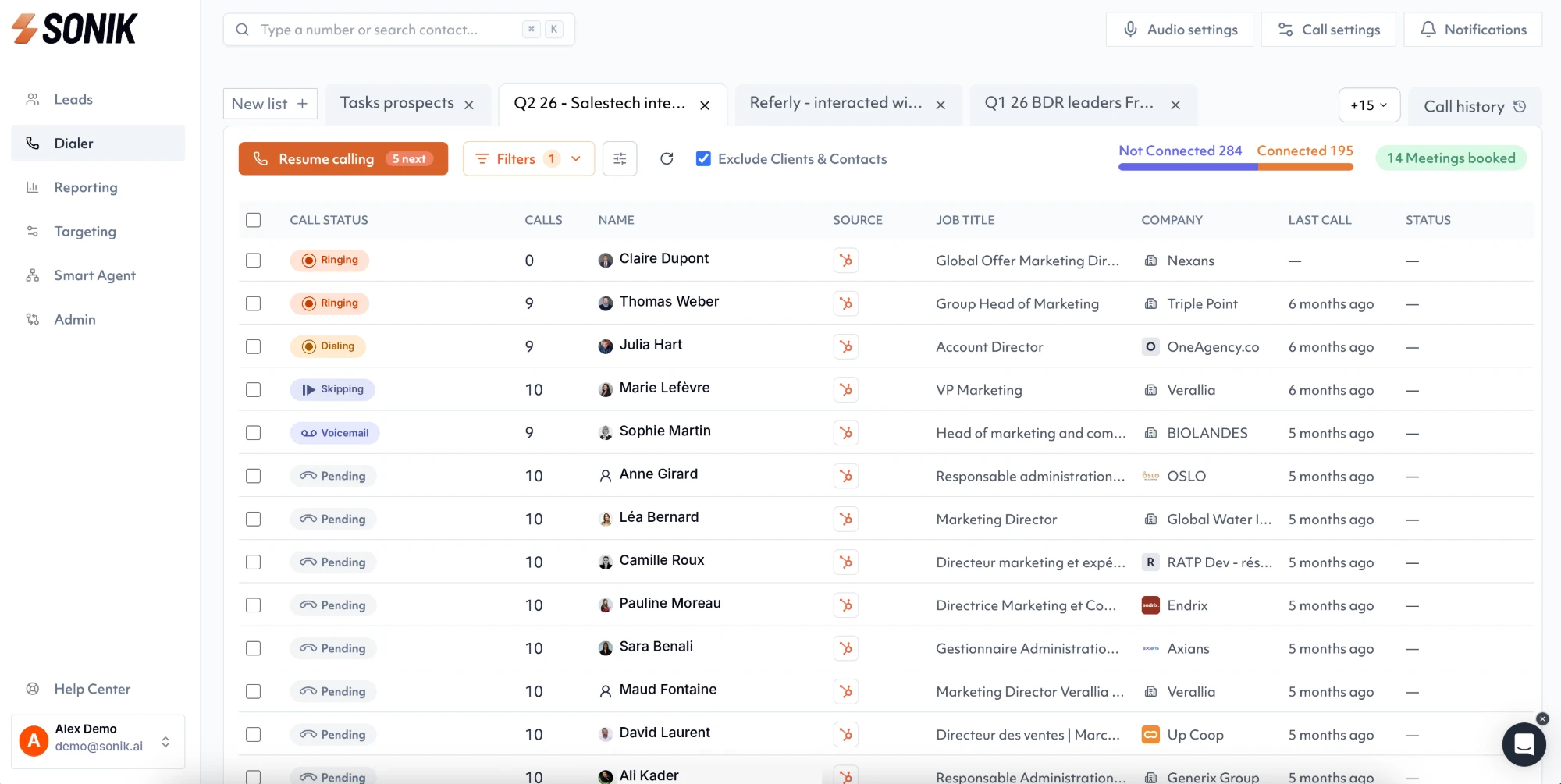
For list work, a Sonik session dials in parallel from a call list built on CRM signals, and connects the rep when someone picks up, with the contact's context already on screen. For a single follow-up, the rep calls the contact directly. In both cases the disposition, duration, recording and AI summary are written on the existing CRM record, so the logging gain of click-to-dial is kept at any volume.
Conclusion
Click-to-dial removes the typing and gets calls logged. It is enough for AEs, account managers and follow-ups. It is not enough for an SDR who needs 20 conversations a day. This week, count conversations per rep per day. Under ten with full calling blocks means the next gain will come from the dialing mode, not from more effort.