
CRM Built-In Calling vs a Dedicated Dialer: When to Switch

Most CRMs can place a call. HubSpot, Salesforce and Pipedrive all offer or sell a calling feature that dials from the contact record and logs the result. For a few calls a day, that is all you need. For a team whose job is outbound prospecting, it is the wrong tool, because native calling is built to record calls and a dedicated dialer is built to produce conversations. The switch is worth making when you cross a small number of thresholds, and they are easy to check.
What built-in CRM calling does well
The native option has real advantages, and for many users they are decisive.
- Nothing to integrate. The call button sits on the contact, the deal and the task. No sync to configure, no second vendor.
- Logging by default. Each call lands on the record with its duration, and usually a recording and notes, depending on your plan.
- One screen. The rep sees the history, makes the call and writes the note without changing tab.
- Enough for low volume. An account executive making ten calls a day to open deals and customers needs exactly this.
If your team's calls are mostly scheduled, mostly answered and few, stop here. A dialer would add cost and a tool to learn, for no gain.
Where native calling runs out
The limits appear when the calls are cold and the list is long.
One line, one click, one call. Native calling dials one number at a time and the rep waits through each ring and each voicemail. In our benchmark of 1,000,000 B2B cold calls, the average connect rate is 11.3%. Nine dials in ten are waiting time, and the rep is present for all of it.
The list is not a session. CRMs organise work as tasks or queues to click through. Between two calls the rep chooses the next record, opens it, reads it, clicks. Those seconds are small and they repeat a hundred times a day.
Minutes, numbers and countries. Depending on the CRM and the plan, calling minutes may be capped, the choice of outbound numbers limited and some destination countries unavailable. Check your own contract. For a team calling France, the UK and Germany from local numbers, this is often the first wall.
Number health is your problem. Outbound at volume needs several numbers, monitoring of spam labels and rotation. Native calling generally gives you a number and leaves the rest to you.
Coaching is thin. A recording on a record is not a coaching system. Finding the five calls worth reviewing among five hundred needs transcription, scoring and search.
Five thresholds that say it is time
- Dials per rep per day. In our experience, below about 30 cold dials a day native calling is comfortable. Above 50, the waiting time dominates the day.
- Conversations per rep per day. Our north star is 20. If full calling blocks produce fewer than ten, the dialing mode is the constraint.
- Share of the day on the phone. A rep whose main job is calling needs a calling tool. A rep who calls between meetings does not.
- Countries and numbers. More than one calling country, or a need for local numbers and rotation.
- Team size. From three or four people prospecting by phone, a manager needs live numbers per rep and a way to review calls at scale.
Crossing one of these is a signal. Crossing three is a decision.
What a dedicated dialer adds
A dialer changes the unit of work from the call to the session.
- Automatic progression. A power dialer calls the next number when the previous call ends. A parallel dialer calls several at once and connects the rep only when a person answers. In our data, parallel dialing gives reps around 5x more conversations: about 127 calls, 10 conversations and 0.66 meetings per hour.
- Lists ordered for calling. By persona, by signal, by time slot. Founders answer more around 10am and marketing around 4pm in our benchmark, and a dialer can order the session accordingly.
- Number management. Local numbers by country, rotation, monitoring.
- Coaching on every call. Transcripts, scoring, the moments worth hearing.
We described the categories in what a sales dialer is.
The integration is the real question
The fear behind "let us stay native" is reasonable: a second tool means data in two places. A dialer is only worth adding if the CRM stays the single source of truth. Six checks before you sign:
- Call lists come from CRM views or lists, not from CSV exports.
- Every call is written back on the existing contact: outcome, duration, recording, notes or summary, next task.
- No duplicate contacts. The dialer should not create records the CRM does not know about.
- Unanswered attempts do not flood the timeline. A counter beats thirty "no answer" entries.
- Ownership is respected. A rep cannot call another rep's accounts by accident.
- Opt-outs flow both ways. A contact marked "do not call" in the CRM is excluded from sessions, and an objection heard on a call is written back. Under GDPR, honouring that objection is an obligation, not a setting.
We went through the HubSpot and Salesforce specifics in parallel dialers for HubSpot and parallel dialers for Salesforce, and the general pattern in connecting your dialer to your CRM.
The mistake in the other direction
Some teams avoid the dialer question by upgrading the CRM to a higher tier for its calling features, or by moving to a CRM chosen for its built-in dialer. Both can be expensive ways to stay on one line at a time. The CRM is a long-term choice made for your data model, your reporting and your integrations. The dialer is a shorter-term choice made for conversations per hour. Choose each for its own job.
The reverse mistake exists too: buying a parallel dialer for two AEs who make eight calls a day. Use the thresholds. Many teams end up with both, and that is fine: native click-to-call for AEs and account managers, a dedicated dialer for the people who prospect.
How Sonik approaches the CRM
Sonik is an AI sales dialer with native, bidirectional integrations for HubSpot and Salesforce, built on one rule: the CRM owns the contact.
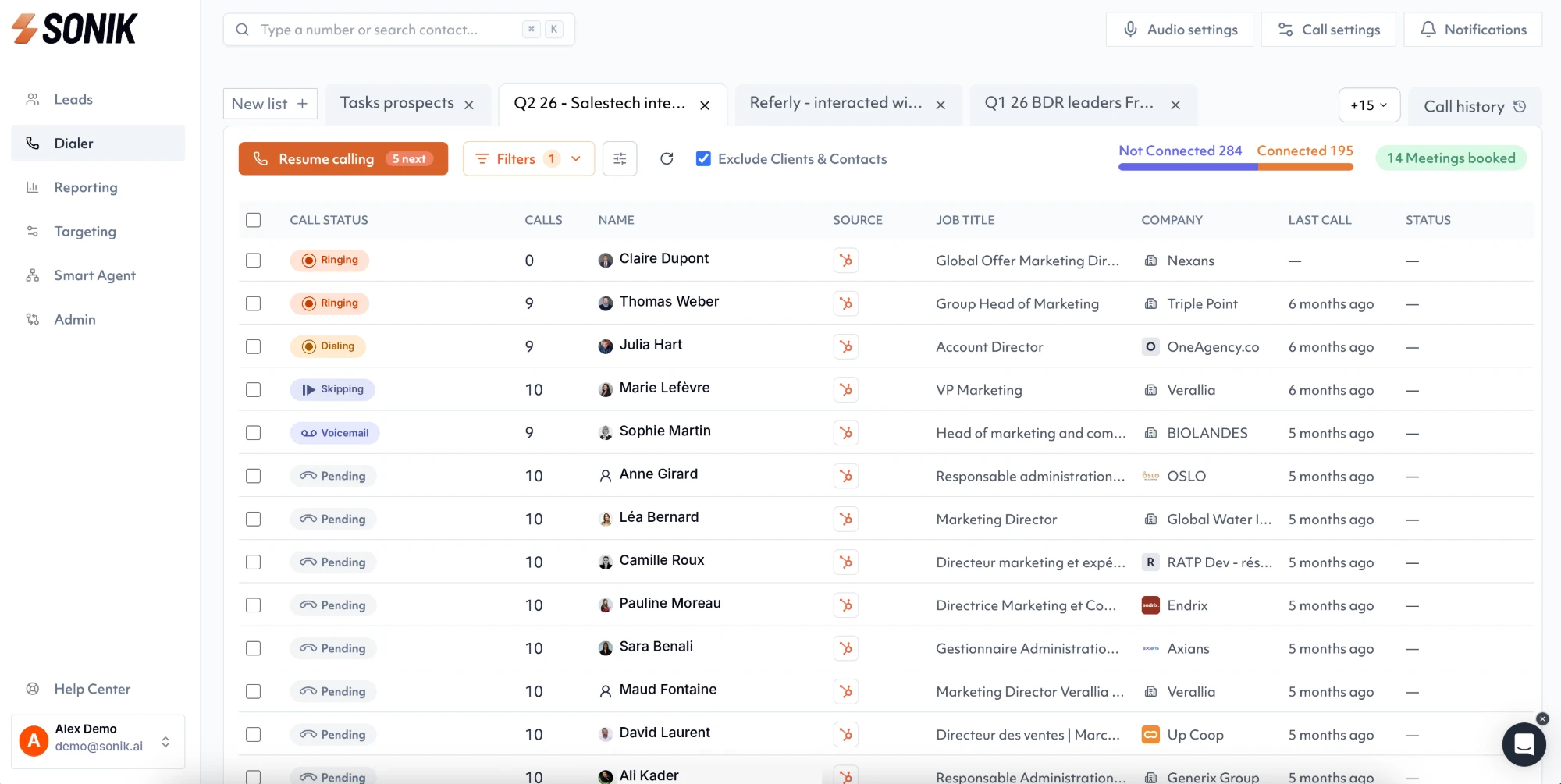
Contacts, personas and signals come from your CRM views, including website visitors, job changes, closed-lost deals, dormant leads and social intent, and become a daily calling list ordered by persona and best time slot. After each call, the disposition, duration, recording, AI summary and next-step task are written on the existing record. Unanswered attempts update a counter. Sonik does not create contacts in the CRM. The rep works in sessions, and the CRM stays the place where the truth lives.
Conclusion
Built-in CRM calling is a logging tool that can dial. A dedicated dialer is a conversation tool that logs. If your reps make a few calls a day, stay native. If they prospect, check the five thresholds this week, starting with conversations per rep per day. Under ten, with full calling blocks, means the CRM's call button is costing you more than a dialer would.