
From Sales Navigator to a Call List in 30 Minutes

Sales Navigator tells you who to call. It does not hand you a file, and it rarely shows a phone number. To get from a search to a dialable call list in 30 minutes, build a search narrow enough to call, move it out through your CRM or an export, add mobiles, clean, order and load it into a session. Here is the workflow, minute by minute.
What Sales Navigator gives you, and what it does not
It gives you the best targeting filters in B2B: function, seniority, company headcount, geography, people who changed jobs in the last 90 days, people who posted recently, teams that are growing. It also gives you saved lead lists and alerts.
It does not give you three things a caller needs.
- A file. There is no native export of a lead list to a spreadsheet.
- Phone numbers. A number only shows when the member chose to display one, mostly to their connections.
- Unlimited results. A search displays up to 2,500 results, 100 pages of 25.
So treat it as a targeting tool. The calling data comes from somewhere else, and the 30 minutes are about joining the two without losing what made the search good.
The 30-minute workflow, step by step
Four blocks. The timings assume one rep, one saved search and an enrichment provider already chosen.
Minutes 0 to 10: build a search you can actually call
A list of 2,000 mixed profiles is a database, not a call list. Aim for 150 to 300 people who share one persona, one geography and one company size band.
Use the filters that double as openers. "Changed jobs in the last 90 days", "posted on LinkedIn in the last 30 days" and department headcount growth are triggers. In our benchmark of 1,000,000 B2B cold calls, trigger-based openers reach a 7-10% meeting rate against 2-3% for pitch-first openers. A filter you can say out loud on the call is worth more than a filter that only narrows the count.
One persona per list. Personas do not answer at the same hour. Founders pick up more around 10am, marketing around 4pm, HR around 1pm. A mixed list cannot be scheduled at the right slot.
Exclude before you enrich. Remove customers, open deals, competitors and anyone who asked not to be contacted. Every profile you enrich costs a credit, and calling a customer as if they were a stranger costs more than that.
Save the result as a lead list named with the persona, the trigger and the date. "Heads of Sales, new in role, FR, Nov 9" tells the next person what the list is for.
Minutes 10 to 15: get the list out
There are two routes, and they do not carry the same risk.
Route one: CRM sync. The higher Sales Navigator plans connect to Salesforce or HubSpot and let you save leads as CRM records. Where you have it, this is the clean route. The contact lands in the CRM with an owner, and nothing leaves in a spreadsheet.
Route two: an export tool. Browser extensions and data tools read a saved list and produce a file. It works, and many teams do it. LinkedIn's user agreement restricts automated extraction, so the risk sits with the account that runs the tool. Decide knowingly, keep volumes modest, and never run several tools on one account at the same time. We do not recommend a specific tool here.
Whichever route you take, keep these columns: first name, last name, job title, company, company domain, LinkedIn URL, location, and the trigger. The trigger column is the one most people drop on the way out. It is also the opener.
Minutes 15 to 25: add numbers, then clean
Enrich from the LinkedIn URL or from name plus company domain, and ask for mobiles first. Coverage varies a lot by country and by persona, so test a provider on 100 of your own contacts before trusting an advertised match rate.
Accept the loss. Part of the list will come back without any number. Move those people to a LinkedIn or email track instead of leaving empty rows in a call list.
Then clean, in this order:
- Format. One international format for every number, with the country code.
- Deduplicate. By LinkedIn URL, then by phone number.
- Spot the switchboards. A number shared by several contacts at the same company is the main line, whatever the column header says.
- Check against the CRM. Remove contacts that already have an owner, an open deal or an opt-out.
- Add three columns. Number type (mobile, direct line, switchboard), number source, enrichment date.
The source column matters in France and across Europe. Prospects ask "where did you get my number?" more often than reps expect. In our experience the rep who answers in one honest sentence keeps the conversation going, and the rep who hesitates loses it.
Minutes 25 to 30: order and load
Order the list before it reaches the dialer. Freshest trigger first. Mobiles before direct lines. Switchboards in a separate list with their own script.
Then schedule the session at the slot where this persona answers. Across personas our benchmark shows 4pm at 15.8%, 10am at 14% and 8am at 9.8%.
Now the arithmetic. Say 200 contacts came back with a number. At the average connect rate of 11.3%, a first pass gives about 23 conversations. That is roughly one day at our north star of 20 conversations per SDR. Thirty minutes of list building for a day of conversations is a good trade. Two hours for the same list is not.
Five mistakes that cost conversations
- A search that is too wide. Three personas in one list means two of them are called at the wrong hour.
- Losing the trigger. Without it, the rep is back to "we help companies like yours".
- Enriching before excluding. You pay for numbers you will delete.
- Never measuring the list. Track conversations per 100 contacts by search and by number source. Stop the searches that underperform.
- Building new lists while the CRM is full. Reps use only about 20% of the signals already in their CRM. A new search should fill gaps, not replace the contacts who already know you.
How Sonik approaches Sales Navigator lists
We start from the CRM, not from a new search. The signal engine reads website visitors, job changes, closed-lost deals, dormant leads and social intent, and half of our own pipeline comes from signals that were already in the CRM. A Sales Navigator list covers the accounts where there is no history yet.
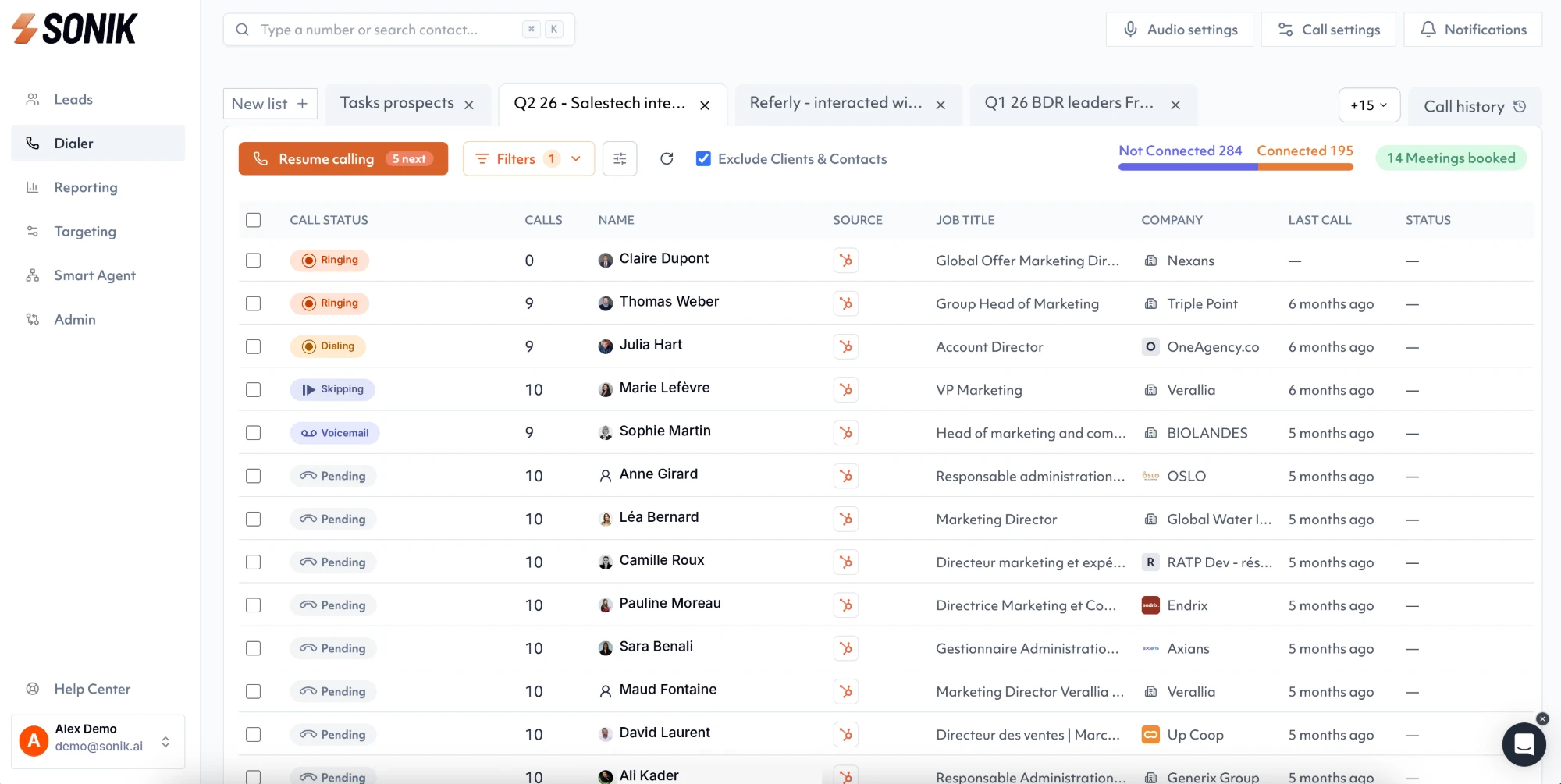
Once the list sits in HubSpot or Salesforce, it becomes a session in the parallel dialer. Reps get about five times more conversations than by dialing one line at a time, so the list is worked while the triggers are still fresh.
AI call prep puts the trigger and the account context in front of the rep before the pickup. The column you protected during the export is the first thing they see.
Conclusion
Sales Navigator is where the list is chosen, not where it is called. Keep the search narrow, carry the trigger all the way to the dialer, and label every number by type and source. This week, time yourself on one list of 200 contacts, then count the conversations per 100 contacts it produced. That number tells you whether the search deserves a second run.