Get started
Still unsure of the impact of Sonik?
See it for yourself and ask for your free trial


The easiest way to set up a sales dialer and get the most out of its features is to do it in a fixed order: connect the CRM and map the fields first, sort out your phone numbers second, build the first list from signals already in the CRM third, and only then touch dispositions, voicemail detection, line count and coaching. Done in that order, a team is calling on day one and using every feature by the end of week one. Done in the reverse order, which is what most teams do, the reps start with ten lines and a CSV, and the CRM fills with duplicates by Wednesday.
This is the rollout we run with every new Sonik customer. It takes about three hours of admin time spread over a week, and the target at the end is measurable: around 127 dials, 10 conversations and 0.66 meetings booked per hour of session.
Treat the setup as a pipeline, not a settings page. Each step feeds the next: field mapping decides what the rep sees, numbers decide the connect rate, the list decides whether the conversations are worth having, and dispositions decide whether any of it lands back in the CRM.

One rule across the seven steps: do not configure a feature you cannot measure yet. Line count, AI summaries and coaching alerts come after the first hundred logged calls, because they need data to be set properly.
Connect HubSpot or Salesforce before anything else, with an admin account, not a rep's. Then map four groups of fields.
Decide now what happens to a contact the dialer touches but did not create. We set Sonik never to create contacts; it only updates the ones you already have. That single decision prevents most of the duplicate mess we see in CRM audits.
Pick numbers with the prefix your prospects expect. For a French list that is a French mobile or a landline from the right region; for a German list, a German one. Carriers ask for proof of a local address, so order foreign numbers early.
Start with a pool of two to four numbers per rep that rotate automatically, and check their health weekly: pickup rate per number, and whether any carrier app labels them. A number that sits below your average connect rate for two weeks goes to rest. Our benchmark average on 1,000,000 B2B cold calls in France is 11.3%; a number at 6% is telling you something.
Do not import a purchased CSV on day one. Build the first list from what is already in the CRM. Reps use about 20% of the signals their CRM holds, and 50% of Sonik's own pipeline comes from signals that were already there.

Four lists cover most teams: website visitors from target accounts in the last 7 days; contacts who changed job in the last 90 days; closed-lost deals older than six months; dormant leads with no activity for 180 days. Order each list by persona and slot: founders pick up more around 10am, marketing around 4pm, HR around 1pm in our data.
Keep the first list short, around 150 contacts. A short list of warm signals beats a long list of cold names, and it lets you check the write-back on real records before volume arrives.
Dispositions are the buttons the rep presses after each call. Keep to six to eight, and make each one trigger something in the CRM.
Test every disposition on a test contact and open the record in the CRM afterwards. If a manager cannot rebuild yesterday's session from the CRM alone, the write-back is not finished.
Answering machine detection decides, within the first second of audio, whether a human or a voicemail picked up. Set it to skip voicemails by default: nine out of ten B2B dials do not reach a human, and a rep listening to every greeting loses the morning.
Two exceptions. On named accounts, let the rep drop a pre-recorded voicemail with a reason to call back. On known contacts, favour bridging speed over detection confidence; a half-second of silence on a familiar voice costs more than on a stranger.
This is the setting every team gets wrong. Parallel dialing on five lines sounds efficient, but a rep who has never run a session cannot handle two pickups in the same ten seconds, and the second prospect hears a silence, then a click.

Start every rep on two lines for the first two days. Move to three when the rep closes the disposition within ten seconds of hanging up and the abandoned-call count is zero. Move to four when the connect rate on the list is at or below our 11.3% average; above it, three lines are enough. Hold at four for most B2B lists.
The result of the ramp is the 5x: about 3.2 conversations an hour by hand, 5.4 with a single-line power mode, 16.2 with parallel lines.
Switch recording on with the announcement your legal team approves, and set retention before the first call, not after. Then turn on call summaries so the notes are written for the rep, and pick two coaching alerts, not ten.
The two that pay in our benchmark: a flag when the rep opens with the pitch instead of a trigger (trigger-based openers reach a 7-10% meeting rate against 2-3% for pitch-first), and a flag when an objection is answered without a question first ("What do you mean?" before answering lifts conversion by 197%).

Measure per hour of session, not per day, because a session is what the setup controls. Our reference session: 127 dials, 10 conversations, 0.66 meetings booked per hour. At three hours of session a day, that is roughly 20 conversations per SDR per day, our north star, and two meetings.
If dials are there and conversations are not, look at the numbers and the slot (steps 2 and 3). If conversations are there and meetings are not, look at the opener (step 7). If everything is there but the CRM is empty, step 4 was skipped.
At Google Cloud, with a quota that went from 1.5 to 10 million euros over five years, I never set up a dialer; someone else owned the tooling. At Salespresso I did my first rollout myself, backwards: many lines on day one, a bought list, dispositions added later. The reps loved the first morning and hated the first Friday, when nobody could tell which dials had turned into a task.
At Referly and then Sonik we wrote the order above down and have not changed it since. The boring steps, mapping and dispositions, are what make the exciting step, parallel lines, pay.
Sonik connects to HubSpot or Salesforce in a first onboarding call, maps the fields with you and never creates contacts you did not have. Lists are built from CRM signals, sessions run on two to five lines with voicemail skipping, and every outcome is written back with the recording and the AI summary.
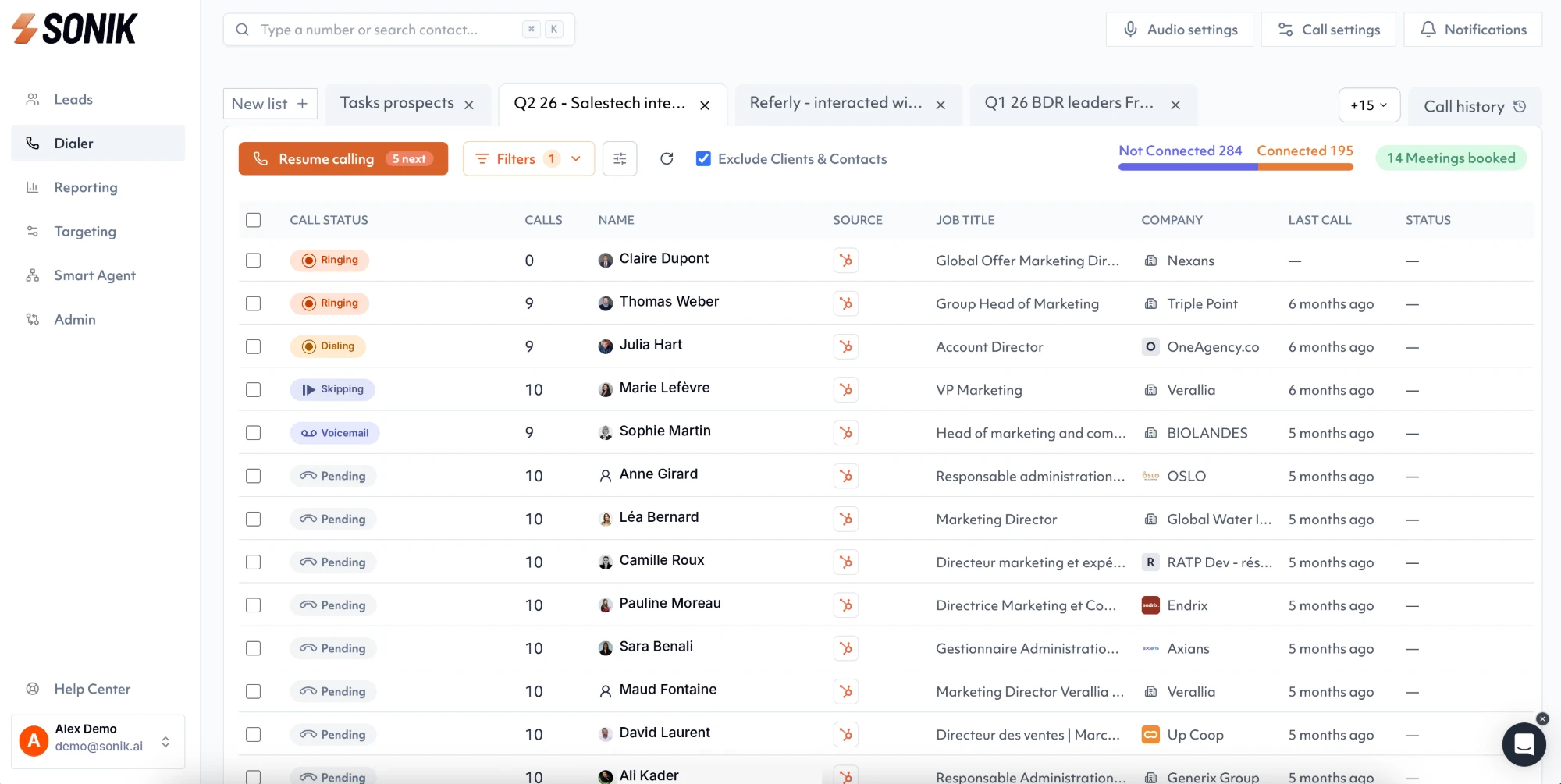
Before each pickup the rep sees the contact brief on one screen: account intelligence, the person's experiences, the signal that put them on the list and the AI qualification.
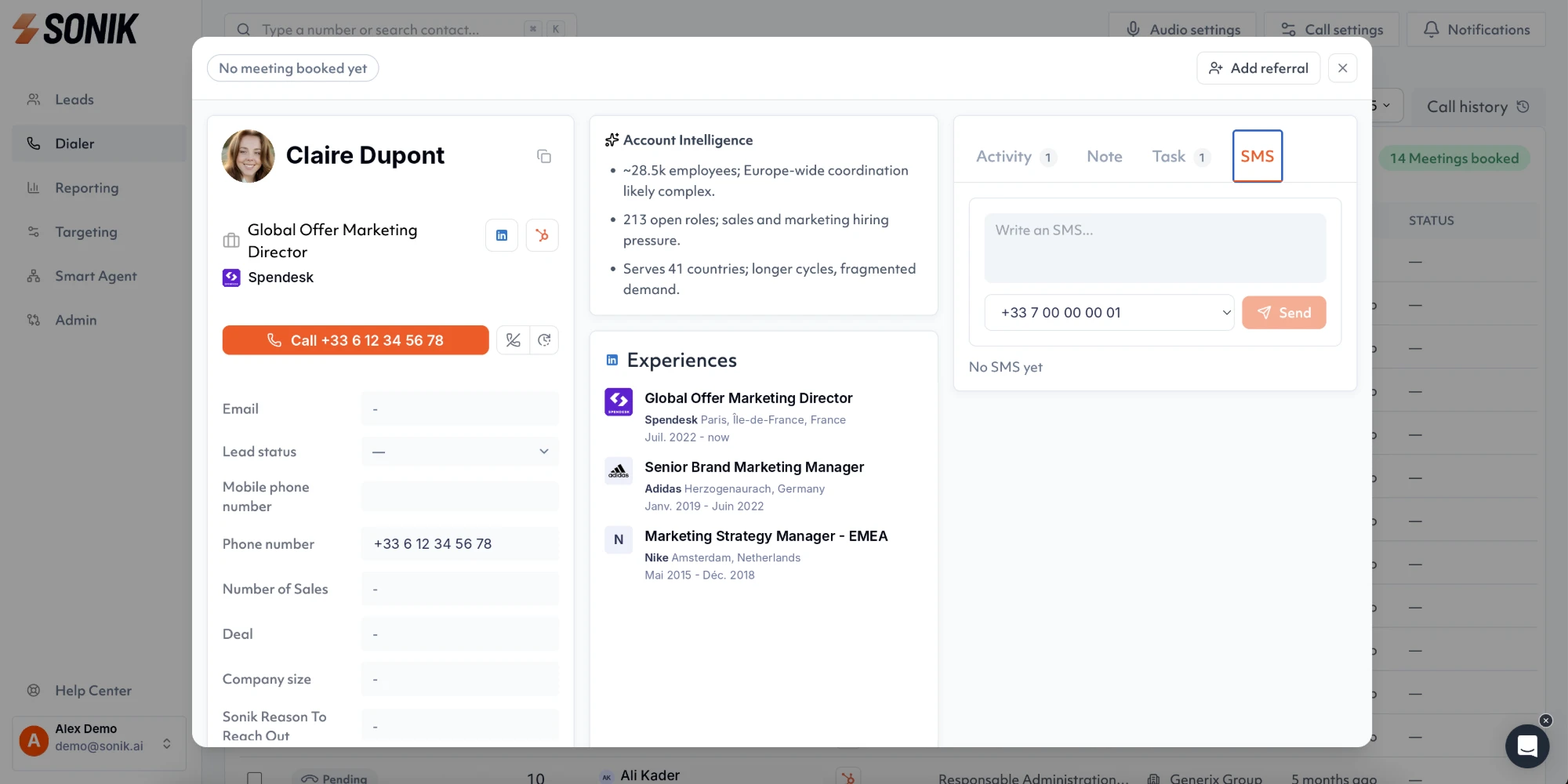
Each licence comes with two rotating mobile numbers, and we ramp new reps from two lines upward in the first week, against the targets above. See the dialer page and the signals page.
About three hours of admin time spread over a week, in our experience: an hour for the CRM connection and field mapping, an hour for numbers and the first list, an hour for dispositions, voicemail and recording. Reps call from day one on two lines; the line ramp and coaching alerts are tuned as logged calls come in.
Start with two parallel lines, which behaves almost like a power dialer, and ramp up once the rep handles dispositions in under ten seconds. Keep a single-line power mode for warm lists such as inbound leads and known contacts, where a prepared opener matters more than volume.
Four groups: identity (name, title, company, phone numbers), context (owner, stage, last activity, open deal), signals (website visit, job change, closed-lost date) and outcomes (call result, notes, recording link, next step). Map the outcome fields as carefully as the inputs; they are what the manager reads on Friday.
Two to four per rep, rotating automatically, with the national prefix of the market called. Check each number's pickup rate weekly and rest any that stays well below your average for two weeks. A rep on four parallel lines wears numbers faster than a rep on one, so the pool grows with the line count.
A sales dialer pays off in the order you set it up: CRM mapping, numbers, signal lists, dispositions, voicemail detection, line ramp, coaching. Each step is a short job, and skipping one shows up in the CRM within a week. This week, open your dialer's settings and check step 4: call a test contact, press every disposition and look at the record. If anything is missing, you have found your first fix.