
Switching Sales Dialers Without Losing Callbacks or Data

To switch sales dialers without losing callbacks or data, move the open commitments first, not the whole database: every promised callback, every opt-out, every disposition that drives a follow-up. Make the CRM the system of record before the cutover, pick one precise changeover time, and keep read access to the old tool for a few weeks. The contact list is the easy part. The promises are what get lost.
What actually gets lost in a dialer switch
Contacts rarely disappear. They live in the CRM, and the new dialer reads them from there.
What disappears is everything the old dialer knew and the CRM did not:
- Scheduled callbacks. "Call me Thursday at 10" stored as a task inside the old tool.
- Opt-outs and do-not-call flags set by a rep during a call.
- Dispositions. "Not now, budget in Q1", "wrong person, ask for the CFO", "left voicemail twice".
- Call history and recordings. Who spoke to whom, when, and what was said.
- Number knowledge. Which number picked up, which one is a switchboard, which one is dead.
- Your caller numbers and whatever reputation they have built.
The first item is the most expensive to lose. In our benchmark of 1,000,000 B2B cold calls in France, calls to known contacts that open with "How have you been?" reach about 10% success, against about 1.5% for a standard cold open. A promised callback is the warmest version of a known contact. Lose 80 of them in a migration and you have thrown away your best calls of the month.
Start with the promises: open callbacks
Two weeks before the switch, export every open callback and follow-up from the old dialer. Not the closed ones. The ones somebody is still expecting.
For each one, you need five things:
- The contact and account, with the CRM ID, not just a name.
- The time the prospect asked for, in their time zone. This is not the same as the rep's reminder. "Thursday at 10" moved to "Thursday, sometime" is a broken promise.
- The note. Why they asked to be called back, and what was said.
- The owner. One named rep, who knows the callback is theirs.
- Where it will live after the switch. One place only.
That last point is the rule that prevents most accidents. During a migration, each open callback must exist in exactly one working queue. If it sits in both tools, two reps call the same prospect, or each assumes the other did.
For a small team, a shared sheet of open callbacks worked by hand for the first week is a perfectly good bridge. Eighty callbacks do not need an import project. They need eighty lines and an owner on each.
Make the CRM the system of record before you switch
The cleanest migration is the one where the old dialer has nothing left that the CRM does not have.
Before the cutover, write back to HubSpot or Salesforce:
- Call activities, with date, duration, outcome and rep, on the contact record.
- Callbacks as CRM tasks, with the due date and owner.
- Opt-outs as a CRM property that any tool must respect.
- Notes and summaries, at least for conversations that reached a decision-maker.
Then map the dispositions. Put the old list and the new list side by side and decide, line by line, what each old outcome becomes. Fewer is better: in our experience, teams carry far more dispositions than their reps ever use. Keep the ones that trigger an action, such as callback, not now, wrong person, opt-out, meeting booked.
This history is not an archive. It is next quarter's call list. Reps use only about 20% of the signals already in their CRM, and 50% of Sonik's own pipeline comes from signals that were already there: dormant leads, closed-lost deals, people who said "not now" six months ago. A switch that drops the "not now" notes deletes the reason for those calls.
Opt-outs, recordings and numbers: the European checks
Three topics deserve a named owner, and in Europe usually a conversation with whoever handles data protection in your company.
Opt-outs. A prospect who asked not to be called again did not ask one tool. They asked your company. Export the full do-not-call list, load it into the CRM and into the new dialer before the first session, and test it with one flagged contact.
Recordings. Decide before the contract ends which recordings you keep, where, and for how long. Ask the old vendor in writing what happens to recordings and data after cancellation, and by when. Do not assume you can download them later.
Caller numbers. Ask early whether your existing numbers can move to the new provider and how long it takes. If they cannot, plan a transition: prospects who call back the old number after a voicemail should still reach someone for a few weeks. New numbers also start with no history, so begin with a moderate volume per number instead of a full day of dials on the first morning.
Cutover day: one time, one queue, one owner
Choose a precise changeover time. Friday at 6pm works better than "sometime next week".
- Before the time: reps finish their blocks and log their last calls in the old tool. Callbacks created in the final days are added to the export, because your first export is already out of date.
- At the time: the old tool goes read-only for reps. No more dialing from it.
- After the time: reconcile. Compare the open-callback list from two weeks ago with the one at cutover. Some were completed, some were added. Do not re-create completed ones.
- Monday morning: each rep opens the new tool and finds their own callbacks, with notes, due today and this week. If a rep cannot find them, the migration is not finished, whatever the admin view says.
Run the first sessions on a short list and check ten records by hand in the CRM: right contact, right outcome, right owner.
Keep a fallback. Read access to the old tool for 30 days, a named person who can look up a history on request, and a written rule for the case where the new setup fails on day one. If you have to go back, anything logged since the cutover, especially new opt-outs, goes back with you.
How Sonik approaches a dialer switch
Sonik works from the CRM, which makes the switch mostly a CRM question. Call lists are built from the signals already in HubSpot or Salesforce, so history that has been written back before the cutover is used from the first session.
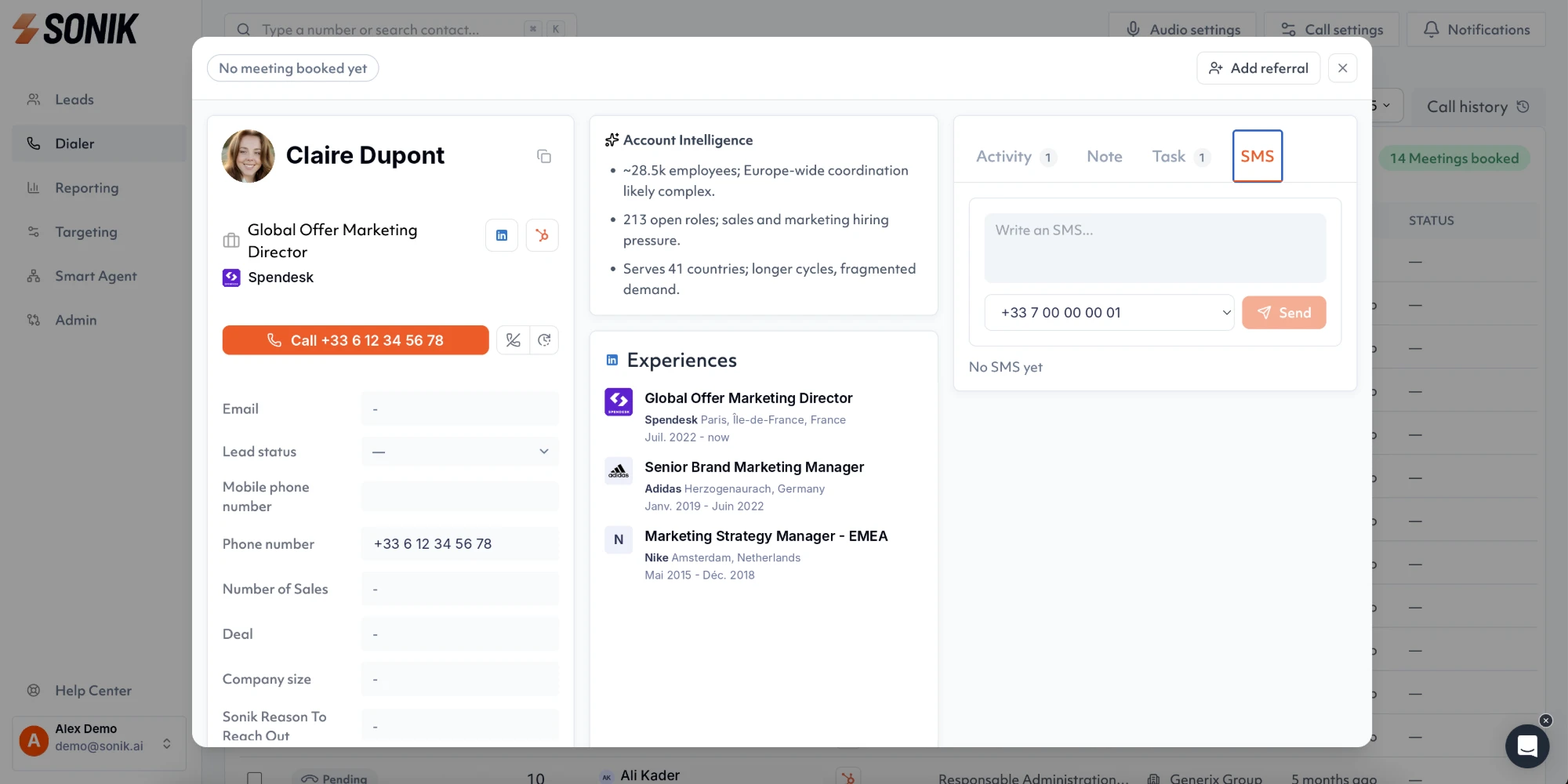
Before each call, AI call prep shows the rep the account context and the signals on the contact. A callback promised in the old tool, once it sits in the CRM with its note, is one of those reasons to call, and the rep opens with the previous conversation instead of starting cold.
For the first week, we recommend a dedicated session on the migrated callbacks, before any new list, in the parallel dialer. Those are the contacts with the highest chance of a conversation, and working them first is also the fastest way to find a mapping error. Our guide on reactivating dormant leads covers what to do with the older "not now" contacts.
Conclusion
Switching dialers is a migration of promises, not of contacts. Export the open callbacks with their requested time, note and owner, write history and opt-outs to the CRM, cut over at one precise time, and keep read access to the old tool for a month. This week, even if the switch is months away, count the open callbacks that exist only inside your current dialer. That number is the size of the risk.