Get started
Still unsure of the impact of Sonik?
See it for yourself and ask for your free trial


A call disposition is the one-click outcome a rep logs when a call ends. Nine of them cover every cold call we have ever made, and each one should trigger something: a retry, a text, a callback date, a hand-off, a parked number. That is the difference between a call log, which records the past, and a dispositioned call list, which builds next week's pipeline. Here are the nine, what each triggers, and the three fields that must stay separate.
"Left VM", "NI", "call back later", "nice guy, try again". Every CRM is full of these. They are honest and useless. Nobody can filter on them, no dialer can act on them, and the rep who wrote "call back later" has no idea in three weeks whether later has come.
In our benchmark of 1,000,000 B2B cold calls, the average connect rate is 11.3%. That means roughly nine out of ten calls end without a conversation, and what happens to those nine is decided entirely by the disposition. Good dispositions are how a team gets a second and third attempt right; bad ones are how a list dies after one pass.
Rang out, no voicemail. Trigger: automatic retry in the next good slot. In our experience most connects happen within the first three attempts, so cap retries at three across different slots (10am, 1pm, 4pm) before the contact rests for two weeks.
Trigger: a one-line text within a minute if the number is a mobile and the context allows, and a retry in two business days. Separate this from "voicemail, no message" so you know whether the prospect has heard your name yet.
Trigger: retry only, same slot rules as no answer. Count these: a list with 60% of attempts landing here is a desk-phone list that needs mobiles.
Trigger: park the number and send the contact to enrichment. Never retry. Repeated dials to dead numbers waste attempts and are one of the patterns carriers read as suspicious for your caller ID.
Trigger: log the time hint ("she is in before 9") on the contact and schedule the retry on it. This disposition is where most of the value in switchboard-heavy lists hides, and most teams do not have it.
Wrong role, company out of profile, no fit. Trigger: mark the contact and let the account rest. Make reps choose a reason from a short list (role, size, no use case) so the ICP can be corrected from data.
The most valuable non-meeting outcome. "Call me in March", "we are in peak until January", "after the audit". Trigger: a dated callback, visible to the whole team, and a signal on the account. Dormant leads called back on the right date with "How have you been?" reach around 10% success in our data against 1.5% for a cold open. This disposition is that 10%.
The prospect asked not to be called again. Trigger: a flag on the contact and the company that the dialer enforces before any future attempt. This is the one disposition that must never be a note.
Trigger: confirmation text, calendar invite, hand-off to the AE with the two-line summary, and the attempt chain closed. Log who else should attend if the prospect said so.
The most common logging mistake is collapsing three different things into one field.
A human answering is not a good outcome by itself; a wrong number can be answered. And a next action without a date and an owner is a wish. Keep the three apart and every report you want falls out of them: connect rate from the first, conversion from the second, pipeline from the third.
Once the nine are in place, the Monday review changes. A rep with a high "voicemail, no message" share needs mobiles, not coaching. A rep with many "not qualified, wrong role" needs a better list. A rep with lots of conversations and few "not now" callbacks is leaving meetings on the table, which is a coaching conversation. We described the seven patterns in 7 SDR performance problems to spot early in dialer data.
A spreadsheet works for one rep testing a list of 200 for a week. It stops working the moment two people call from it: no ownership, no suppression, no reminders, and a copy on someone's desktop that is three days stale. The working record has to be where the dialing happens, with the CRM written automatically. We covered why CRMs under-report calls in why your CRM hides your outbound activity.
Every call in a Sonik session ends on a disposition, one click, chosen from the nine above with your own labels. Each disposition carries its trigger: no answer schedules the retry in the next slot, voicemail opens the text, dead number parks and sends to enrichment, not-now creates the dated callback and the signal, do-not-call blocks the contact and the company.
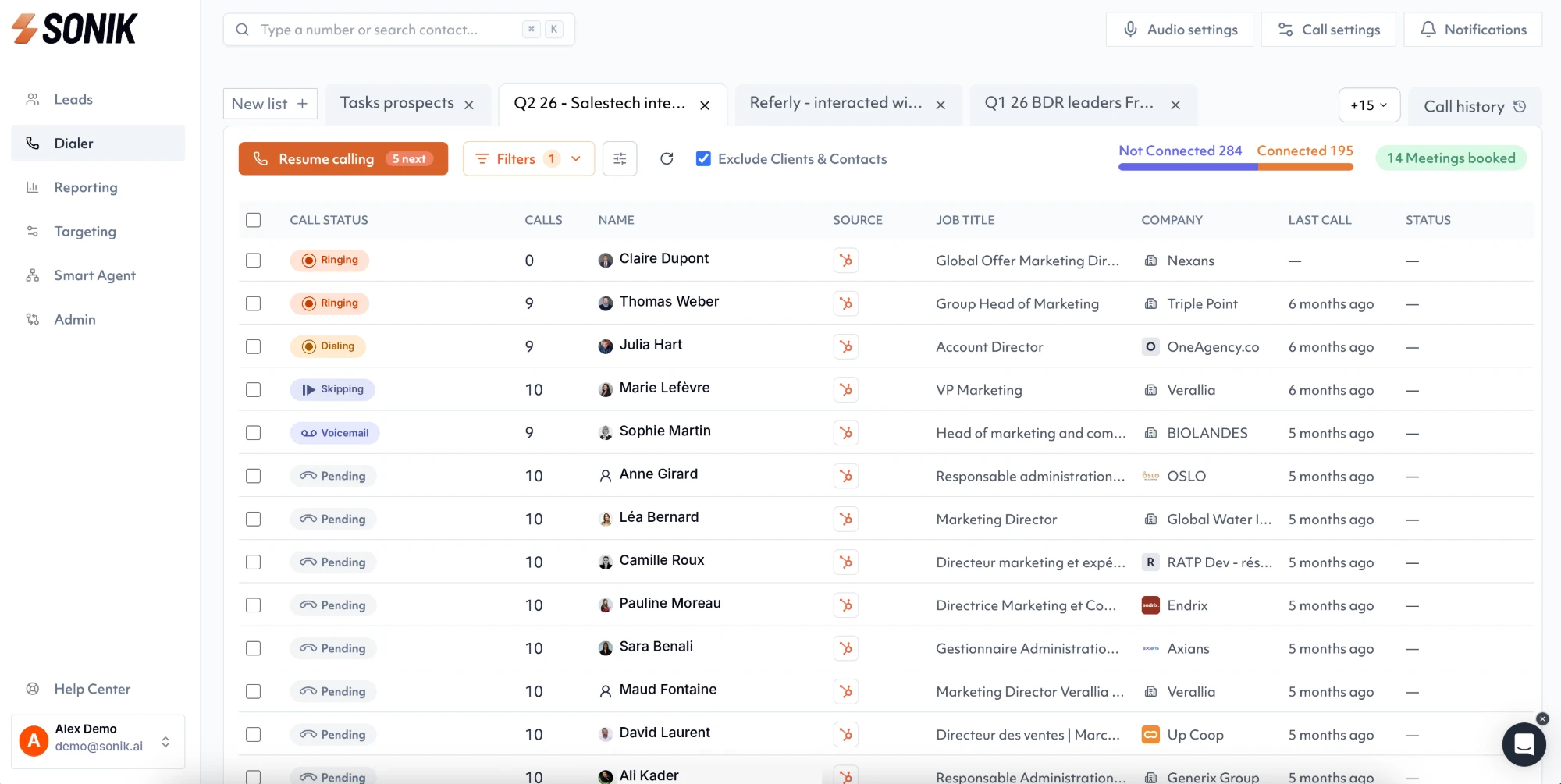
The CRM is written from the disposition, not the other way round, so the call result, the outcome and the next action land in three fields a manager can report on. During the session the rep sees the live statuses and the running count of meetings booked; after it, the manager sees the disposition mix per rep and per list, which is where the next week's fix usually is.
Nine outcomes, three separate fields, one click. This week, export last week's call notes, sort them into the nine dispositions by hand, and count how many "call back later" entries have no date. That number is pipeline you already earned and cannot find. Fix the logging before you buy another list.