
The Prospect Record: 12 Fields a Caller Actually Needs

A prospect record built for calling needs 12 fields: who the person is, how to reach them, why to call now, what happened last time and what happens next. Everything else is optional, and most of it is never read.
The test for any field is simple. Does it change what the rep does in the ten seconds before the dial or the ten seconds after the hang-up? If not, it does not belong on the first screen.
What a prospect record is for when you dial
Most CRM templates are designed by the person who builds reports. The record ends up with 60 properties, half of them empty, and the phone number is three scrolls down.
A caller uses the record differently. Before the call, it answers "why this person, why now, what do I say first". After the call, it captures the outcome so the next attempt is smarter than this one.
Between the two, it feeds the machine: which list the contact lands in, when they are called again, and who owns the follow-up.
The 12 fields that change the call
Reach: can I get this person on the phone
- Direct or mobile number. The number that rings on the person, not the building. We compare the options in direct dial, mobile or switchboard.
- Number status. Valid, wrong number, switchboard only, do not call. A number without a status gets redialed forever by someone.
- Location and language. Country, time zone and the language to open in. A European team needs this on every record.
- Best slot. When this contact, or this persona, tends to answer. In the Sonik benchmark of 1,000,000 B2B cold calls in France, founders pick up more around 10am, marketing around 4pm and HR around 1pm.
Relevance: why this call, why today
- Role and seniority. The job title in plain words, plus whether the person decides, influences or uses.
- Company segment. Industry and headcount band, enough to pick the right talk track. Two values, not a paragraph.
- Trigger or signal, with its date. Website visit, job change, closed-lost deal, dormant lead. The date matters as much as the signal: a visit from yesterday and one from March are not the same call.
Memory: what happened and what is next
- Last outcome. The disposition of the most recent attempt, from a short fixed list: no answer, gatekeeper, call back later, not interested, meeting booked.
- Attempts and last attempt date. How many times and when. It prevents both giving up too early and calling the same person three times in a day.
- Last conversation note. Two lines in the prospect's words: the current tool, the objection, the name of the colleague they mentioned.
- Next step, with a date. Call back Thursday 4pm, send the case study, meeting with the AE on the 14th. A record without a next step is a dead record.
- Owner. One name. Shared ownership is how two SDRs end up calling the same prospect on the same morning.
Mandatory versus optional fields
Make a field mandatory only when the call cannot happen, or cannot be followed up, without it.
Mandatory at creation: number, number status, role, company segment, owner. If one is missing, the contact should not enter a call list.
Mandatory after each call: last outcome, attempts, next step. These should be one click or automatic. If logging takes longer than the call, reps stop logging.
Filled when it exists: trigger, best slot, conversation note, language. Valuable, but forcing a value produces junk like "n/a" and "see notes".
In our experience, every mandatory free-text field ends up filled with a single character by the end of the quarter. Use short picklists for anything you want to filter on.
The fields nobody reads before a call
Some properties look serious and never change a conversation.
- The company's postal address, when you sell remotely.
- Exact revenue figures. A size band is enough to choose the script.
- A lead score nobody can explain. If the rep cannot say why the score is 72, the rep ignores it.
- Marketing campaign history in full. One line, the latest meaningful touch, is plenty.
- A long biography pasted from LinkedIn. The rep has 20 seconds, not two minutes.
Keep them in the CRM if reporting needs them. Move them off the calling view.
The opposite problem is more expensive. Reps only use about 20% of the signals already in their CRM, mostly because those signals are buried in properties no one opens. A trigger that is not on the first screen does not exist.
How the record feeds call lists and callbacks
Each field should drive a decision without a human in the middle.
- Number status removes wrong numbers and opt-outs from every future list.
- Best slot and persona decide which session the contact joins. Marketing at 4pm, founders at 10am.
- Trigger date sets priority: the freshest signals are called first. More on that in who to call first.
- Last outcome and attempts decide the retry: tomorrow at another hour, next week, or never.
- Next step date creates the callback, which goes to the top of the day. See callbacks and hot numbers.
If a field does not feed one of these rules, ask again why it is there.
One note for European teams: a record is personal data. Keep what the call needs, record where the number came from, and honour opt-outs fast. Your DPO or legal counsel should confirm the details for your case.
How Sonik approaches the prospect record
In Sonik, the record is what the rep sees in the seconds before a pickup, so it is built around the same three questions: reach, relevance, memory.
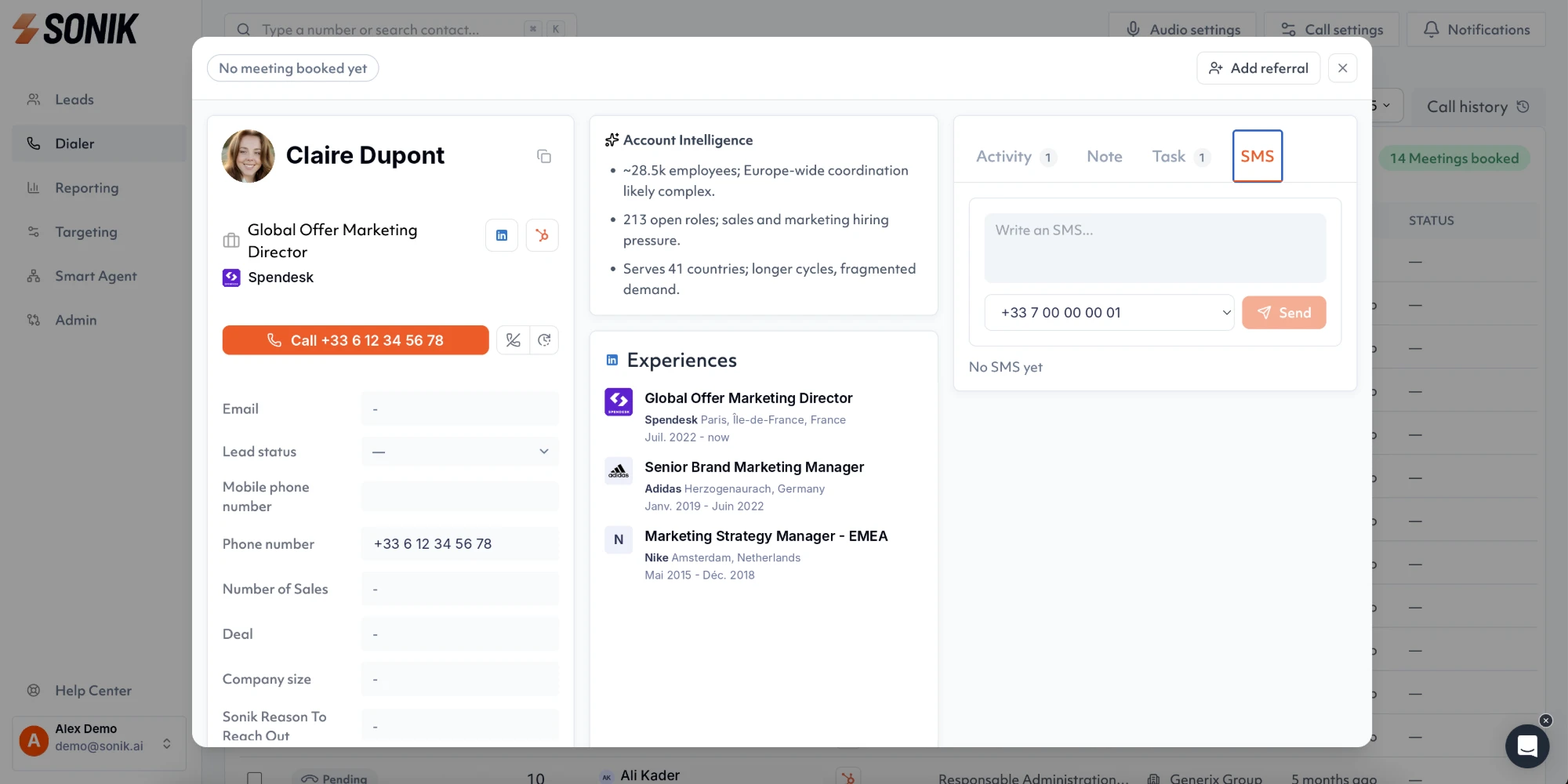
The contact view puts account intelligence, the person's experiences and the signals that qualify the contact on one screen, next to the call button. The rep does not open five tabs to find the trigger.
After the call, the outcome and the AI summary go back to HubSpot or Salesforce, and the next step becomes a callback in the dialer. 50% of Sonik's own pipeline comes from signals that were already in the CRM. The record is where they become visible.
Conclusion
A good prospect record is short, and every field earns its place by changing the call or the follow-up. This week, open the record of the last contact you called and count the fields you actually read before dialing. Put those first. Hide the rest from the calling view.