
Dialing From Salesforce Reports and HubSpot Lists: Setup Guide

The best call list is not a CSV exported on Monday. It is a saved filter in your CRM, a Salesforce report or list view, or a HubSpot list or saved view, that your dialer reads directly. The list updates itself as records change, calls are written back on the same records, and nobody uploads anything. Setting it up takes seven steps: filter, require a number, exclude, sort, keep it dynamic, connect, and write back. Here is each one, for Salesforce and HubSpot users.
Why dial from a report or list instead of an export
An export is out of date the moment it is created. The contact who booked a meeting yesterday is still in the file. The lead who asked not to be called is still in the file. The rep who dials it creates duplicates, calls a colleague's customer and logs outcomes somewhere the CRM cannot see.
A saved filter avoids all three. It also puts the signals you already have to work. Reps use only about 20% of the signals in their CRM, and half of Sonik's own pipeline comes from signals that were already there: closed-lost deals, dormant leads, job changes, website visits. Each of those is a filter away from being a call list.
Steps 1 to 3: decide who is on the list
1. Filter on persona and signal
Start from one reason to call, not from "all leads". One list per signal, for example:
- Opportunities closed-lost between 6 and 18 months ago, primary contact still at the company.
- Leads created in the last 12 months, never reached, with a sales or revenue title.
- Contacts at accounts with a pricing-page visit in the last 7 days.
- Contacts whose job title or company changed in the last 90 days.
In Salesforce this is a report or a list view on leads or contacts, with cross-filters for the account or opportunity conditions. In HubSpot it is a list or a saved view on contacts with company and deal properties as filters. Add the owner filter that matches your rules: "my records" for a personal list, a team or territory for a shared one.
2. Require a number worth dialing
Add "mobile phone is not empty" or "phone is not empty". A contact without a number cannot be called, and leaving them in hides the real size of the list. If your CRM stores several numbers, decide which field the dialer should use first. Mobiles and direct lines reach the person. A switchboard reaches a gatekeeper. We covered the checks in cleaning your list before a session.
3. Exclude who should not be called
This is the step exports skip. At minimum:
- Contacts on accounts with an open opportunity, unless the list is for the AE who owns it.
- Existing customers, unless it is an expansion list.
- Anyone marked "do not call" or who has objected to prospecting. Under GDPR that objection has to be honoured, and in a saved filter it is honoured automatically, every day.
- Contacts with a conversation in the last 7 days, or a meeting already booked.
- Contacts with more than a set number of unanswered attempts this month.
Steps 4 and 5: order it and keep it alive
4. Sort for the session
The order of the report is the order of the calls, so choose it. Put the hottest signal first: callbacks and recent pickups, then recent website visits, then the rest. Then think about the clock. In our benchmark of 1,000,000 B2B cold calls, 4pm is the best slot across personas (15.8% connect rate), then 10am (14%), and 8am is the weakest of the three (9.8%). Founders answer more around 10am, marketing around 4pm, HR around 1pm. If your dialer does not order by time slot itself, build one list per persona and run each in its hour. For teams calling several countries, add the country or time zone as a column so that nobody is called at 7am local time. See who to call first.
5. Keep it dynamic
Use a filter that re-evaluates, not a frozen snapshot. In HubSpot terms, a list that updates as contacts meet or stop meeting the criteria. In Salesforce, a report or list view that the dialer re-reads at the start of each session. The effect: a contact who books a meeting disappears from the list, and a deal lost today will enter the closed-lost list in six months without anyone thinking about it.
Keep each list between 100 and 500 contacts. Fewer, and the session ends before it starts. More, and the criteria are too loose to give the rep a first sentence.
Steps 6 and 7: connect it and close the loop
6. Point the dialer at the view
How this works depends on your dialer. The questions to ask the vendor are the same in every case. Does it read reports, list views and lists directly, or only static imports? Does it keep the sort order? How often does it refresh? Which phone field does it dial, and can you choose? What happens when two reps load overlapping lists? The last one matters more than it seems, and we covered it in two SDRs calling the same prospect.
7. Write the outcome back, so the list cleans itself
The loop closes when the call result lands on the record and the filter reacts to it. A meeting booked sets a field that excludes the contact. A "not interested" sets a date before which they will not reappear. A wrong number clears the phone field or flags it. An unanswered attempt increases a counter that step 3 uses as a limit. With this in place, the list never needs manual cleaning. Without it, the rep meets the same voicemail every morning.
Agree on a short set of outcomes first. We proposed nine in call dispositions.
Four lists to build first
- Callbacks and pickups. Anyone who answered or asked to be called back in the last 14 days. Calls to people who know you succeed about 10% of the time in our data, against roughly 1.5% cold.
- Closed-lost, 6 to 18 months. The context exists, the timing has changed.
- Recent visitors. Contacts at accounts seen on the pricing or demo page this week.
- Dormant leads. A past conversation, no activity for 90 days.
Run them in that order. Most teams find a week of calls in lists one to three before touching a cold account.
How Sonik approaches CRM call lists
This is how Sonik is built to work. It has native, bidirectional integrations for HubSpot and Salesforce, and the rule is that the CRM owns the contact.
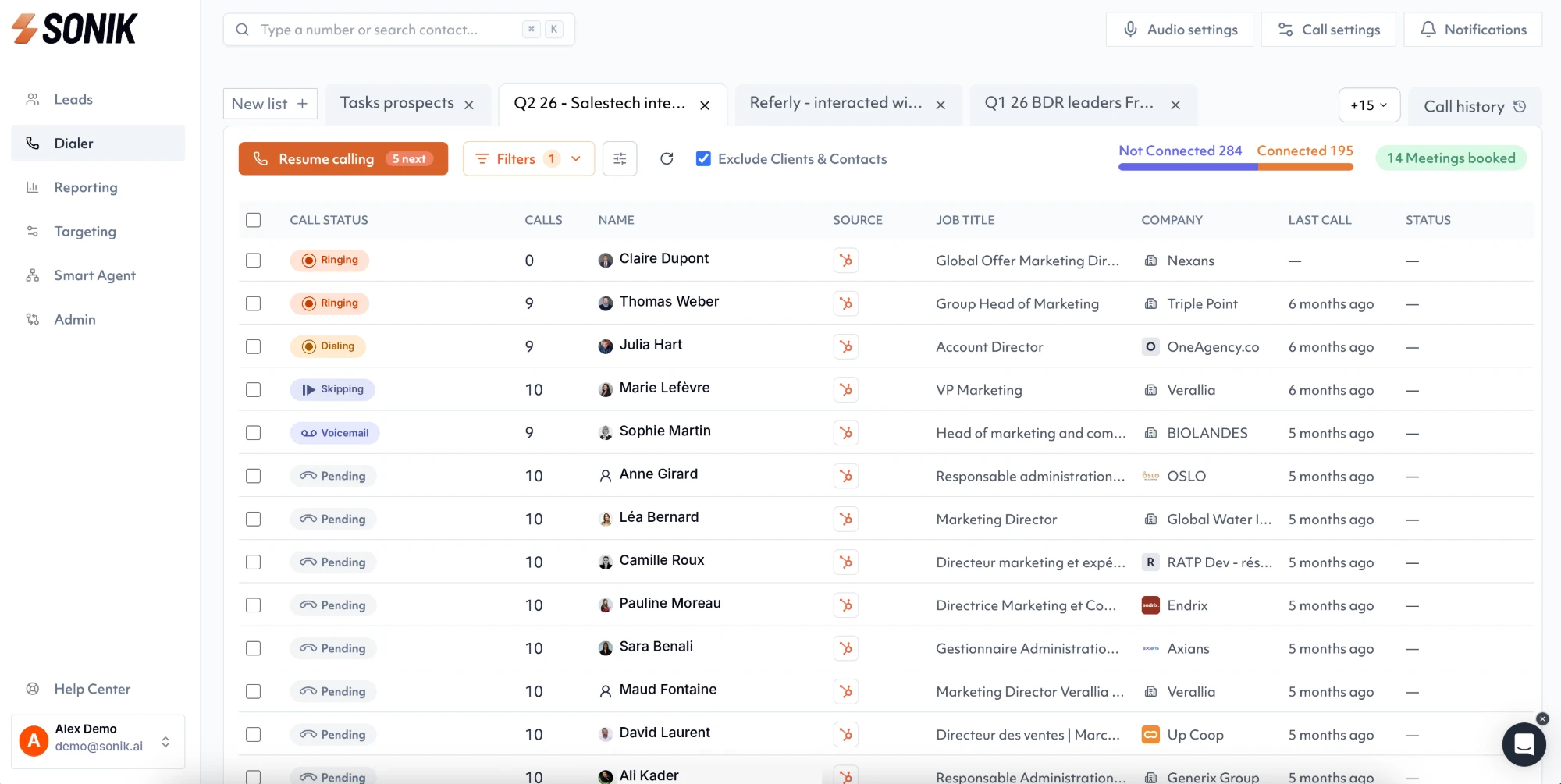
Contacts, personas and signals come from your CRM views and become a daily calling list ordered by persona and best time slot. The rep starts a session and Sonik dials in parallel, around 5x more conversations than one line at a time. After each call, the disposition, duration, recording, AI summary and next-step task are written on the existing record, and unanswered attempts update a counter. Sonik does not create contacts in the CRM, so your saved filters stay accurate.
Conclusion
A call list should be a living filter in the CRM: one signal, a number, clear exclusions, a chosen order, and outcomes written back. This week, build one of the four lists above, the closed-lost one is the quickest, and run a single session from it. Compare the connect rate and the meetings with your last exported file.